A lot of people know their website should load quickly, but they are not always sure how to check it properly. A site can look good on the surface and still feel slow, jump around while loading, or take too long to respond when someone clicks a button.
That is where PageSpeed Insights can be useful. It is a free tool from Google that checks how a page performs and gives you suggestions for improving speed, usability and overall website performance.
Questions like “What is PageSpeed Insights?”, “Is page speed important for SEO?” or “Why is my website scoring badly?” come up a lot during website projects. They are normal questions. Most business owners do not spend their time reading performance reports, so the wording inside tools like PageSpeed Insights can feel more technical than it needs to be.
In simple terms, PageSpeed Insights helps you understand whether your website is loading quickly, whether visitors are getting a smooth experience, and what might be slowing things down. It is not about chasing a perfect score for the sake of it. It is about making the website easier to use.
This guide explains PageSpeed Insights in plain English, including what it checks, why page speed matters, how to test your website and what you can do to improve your score. If your website feels slow or has become weighed down by plugins, large images or old code, ND9 can help with website design, development and ongoing website support. You can also get in touch here if you want to talk through your current website.
Quick links
- What PageSpeed Insights is
- Why page speed matters
- How to check your website speed
- What the PageSpeed Insights score means
- What Core Web Vitals are
- Common reasons websites are slow
- How to improve your PageSpeed Insights score
- Page speed for WordPress websites
- Page speed and SEO
- Frequently asked questions
What PageSpeed Insights is
PageSpeed Insights is a free testing tool from Google. You enter the URL of a page, run the test, and it gives you a report showing how that page performs on mobile and desktop.
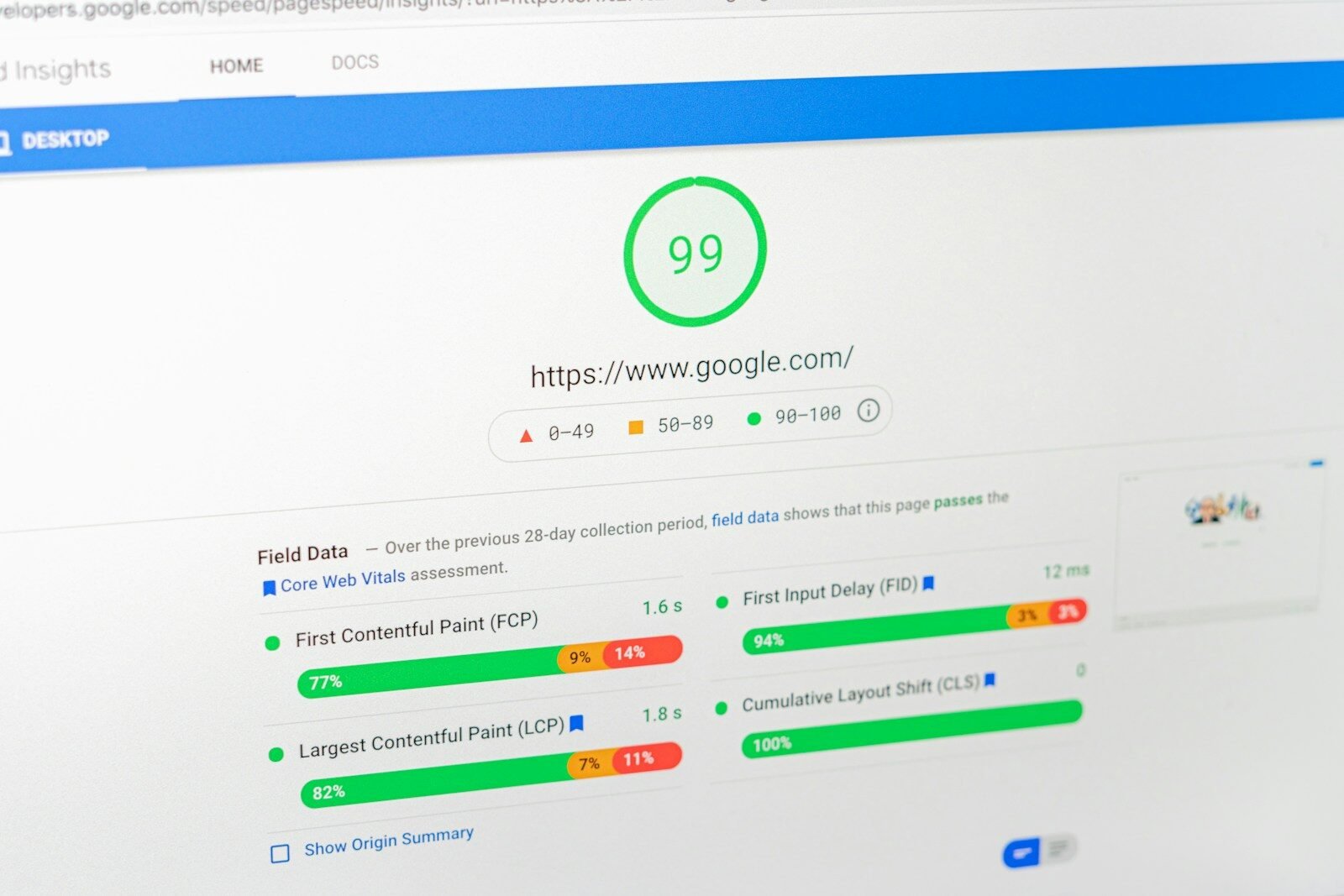
The report looks at things like how quickly the main content loads, how responsive the page feels, and whether the layout moves around while the page is loading.
It also gives suggestions for improvement. These might include reducing image sizes, removing unused code, improving server response time, setting up better caching or dealing with scripts that are slowing the page down.
The useful thing about PageSpeed Insights is that it gives you a clearer starting point. Instead of guessing why a website feels slow, you can see which parts of the page are causing the biggest issues.
That does not mean every recommendation is easy to fix, or that every website needs a perfect score. But it does give a helpful overview of how the page is performing and where improvements could be made.
Why page speed matters
Page speed matters because people do not like waiting. If a website takes too long to load, some visitors will leave before they properly see what the business offers.
This is especially important on mobile. A website might feel fine on a fast office connection, but slower for someone browsing on a phone with weaker signal. That real-world experience matters.
A faster website can help with:
- User experience
- Mobile usability
- Search engine performance
- Enquiry rates
- Trust and professionalism
- Reducing frustration for visitors
For small businesses, this can make a real difference. Your website might be the first proper impression someone gets of your business. If it loads slowly, jumps around or feels awkward to use, it can make the whole business feel less polished.
Good website performance is not just a technical detail. It affects how confident people feel when they land on your site, how easily they can move through the content and how likely they are to take the next step. This connects closely with the wider reasons some small business websites struggle to generate leads, where speed, structure and clarity can all affect enquiries.
How to check your website speed
Checking your website with PageSpeed Insights is straightforward.
- Go to Google PageSpeed Insights
- Enter the URL of the page you want to test
- Click analyse
- Review the mobile and desktop results
- Look through the suggested improvements
It is worth testing more than just your homepage. A homepage might perform reasonably well, while a service page, gallery page, booking page or blog post could be much slower.
For example, a page with lots of images, embedded maps, videos, forms or third-party scripts may have a different result from a simpler page. That is why it is useful to test the pages that matter most to your business.
These usually include:
- Your homepage
- Your main services page
- Important individual service pages
- Your contact page
- Landing pages
- Booking or enquiry pages
- High-traffic blog posts
If you are working through a wider website review, it can also help to compare speed with the structure, content and calls to action on the page. A fast page is good, but it still needs to explain the business clearly and guide visitors properly.
That is something covered more broadly in the website development guide here, where the focus is not just how a site looks, but how well it works as a business asset.
What the PageSpeed Insights score means
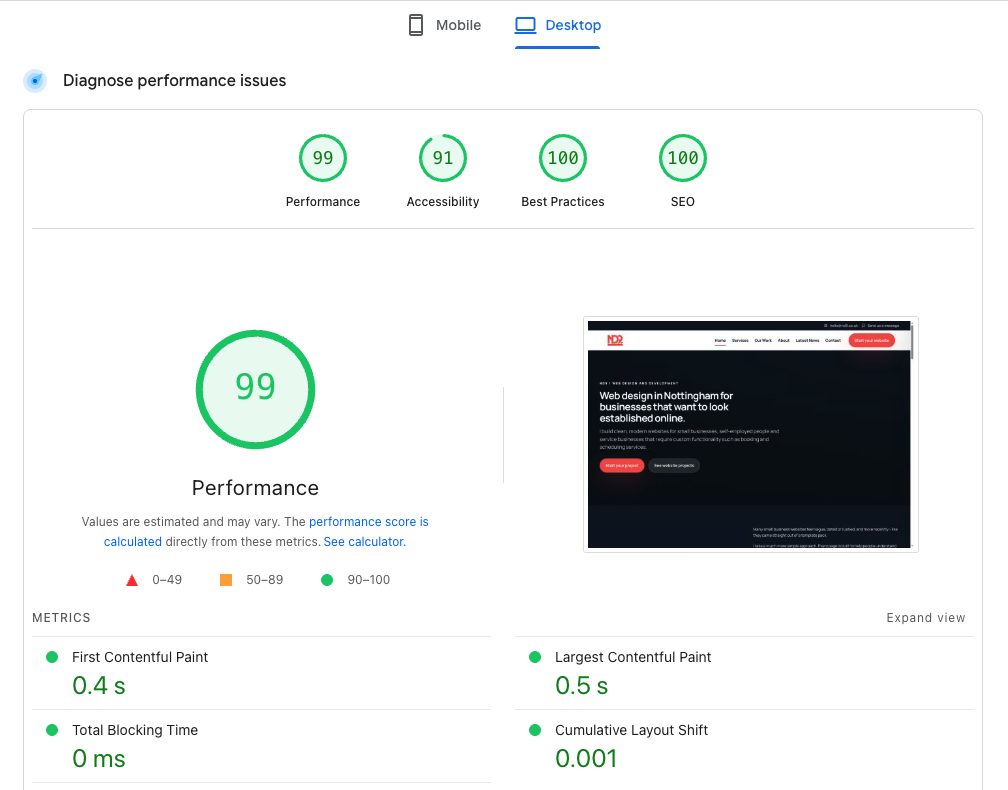
PageSpeed Insights gives a performance score out of 100. This score is shown separately for mobile and desktop.
As a general guide:
- 90 to 100 is considered good
- 50 to 89 needs improvement
- 0 to 49 is poor
A higher score usually means the page is performing better, but the score should not be looked at in isolation. The real goal is to make the website fast, stable and easy to use for real visitors.
Some websites include features that naturally add extra weight to the page. Booking tools, maps, videos, galleries, analytics, live chat and third-party scripts can all affect performance.
That does not mean those features are always bad. It just means they should be used carefully. A useful feature that helps users may be worth keeping, but unnecessary scripts or bloated plugins should usually be reviewed.
Do you need a perfect 100 score?
No, not always. A perfect PageSpeed Insights score can look nice, but it is not always realistic or necessary.
A better aim is to have a website that loads quickly, feels smooth, works well on mobile and supports the goal of the page. A clean, helpful website with a strong user experience is usually more valuable than stripping everything back just to chase a number.
The score matters, but it should be treated as part of the bigger picture.
What Core Web Vitals are
Core Web Vitals are a set of performance measurements that focus on real user experience. They are designed to help show whether a page feels fast, responsive and stable.
The three main Core Web Vitals are:
- Largest Contentful Paint – how quickly the main content of the page loads
- Interaction to Next Paint – how quickly the page responds when someone interacts with it
- Cumulative Layout Shift – how much the layout unexpectedly moves while loading
These sound technical, but the ideas behind them are simple.
If the main content takes too long to appear, the page feels slow. If buttons or menus take too long to respond, the page feels clunky. If the layout moves around while someone is trying to click, the page feels frustrating.
Core Web Vitals are useful because they focus on the experience visitors actually have, rather than just whether the page eventually loads.
Common reasons websites are slow
There are several common reasons a website might perform badly in PageSpeed Insights.
- Large, uncompressed images
- Too many plugins
- A heavy WordPress theme
- Unused CSS or JavaScript
- Slow hosting
- Poor caching setup
- Large background videos
- Too many tracking scripts
- External fonts loading inefficiently
- Embedded maps, feeds or third-party tools
In many cases, slow websites are not caused by one single issue. They are caused by lots of small things building up over time.
A website might start off fairly light, then gradually become slower as more plugins, popups, scripts, forms and design features are added. This is especially common with WordPress websites that have been edited by different people over several years.
That is why website performance is often part of a bigger review. It is not just about fixing one image or installing one plugin. Sometimes the whole setup needs to be simplified as part of wider website support and development work.
How to improve your PageSpeed Insights score
Improving your PageSpeed Insights score usually means making the website cleaner, lighter and better optimised.
The exact fixes depend on the website, but these are some of the most common areas to look at.
1. Optimise your images
Images are one of the biggest causes of slow loading pages. Large images should be resized, compressed and used in suitable formats.
There is no need to upload a huge image if it only appears as a small section on the page. Oversized images can slow the page down without adding any real benefit for the visitor.
2. Use better hosting
Hosting can have a big impact on performance. If the server is slow, the website starts from a weak position before the page even begins loading properly.
Good hosting gives the website a stronger foundation. This is especially important for business websites where speed, uptime and reliability matter.
3. Reduce unnecessary plugins
Plugins can be useful, but too many can slow a website down. Some add extra scripts, styles, database queries or background processes.
Removing unused plugins is often a simple improvement. It also helps reduce clutter and can make the website easier to maintain over time.
4. Improve caching
Caching helps your website load faster by storing parts of the page so they do not need to be rebuilt from scratch every time someone visits.
A good caching setup can make a noticeable difference, especially for WordPress websites.
5. Clean up unused code
Some websites load CSS and JavaScript that is not needed on every page. This can happen because of themes, plugins, page builders or old features that are no longer used.
Cleaning up unused code can reduce the amount the browser has to load and improve the overall performance of the page.
6. Be careful with third-party scripts
Analytics tools, chat widgets, booking systems, embedded maps and tracking scripts can all add weight to a page.
Some of these tools may be important, but they should still be reviewed. If a script is not helping the business or the user, it may not be worth the performance cost.
7. Keep the website maintained
Performance is not something to check once and forget about forever. Websites change over time. New content gets added, plugins get updated, images are uploaded and features are changed.
That is why ongoing website support can be useful. A website that is looked after properly is less likely to become slow, outdated or difficult to manage.

Page speed for WordPress websites
WordPress is a strong option for many small business websites, but it still needs to be set up properly. A WordPress website can be fast, clean and easy to manage, or it can become slow and bloated if too much is added without care.
Common WordPress page speed issues include:
- Heavy themes
- Too many plugins
- Large image uploads
- Page builders adding unnecessary code
- Poor hosting
- Lack of caching
- Old plugins or unused features
This is why the build approach matters from the start. A lightweight, well-structured WordPress website will usually be easier to maintain and improve than one that relies on lots of unnecessary extras.
For many businesses, the best setup is one that gives enough flexibility to update content without making the site heavier than it needs to be.
You can see examples of more considered website builds in the projects section, where the focus is on clear structure, strong presentation and practical functionality.
Page speed and SEO
Page speed can support SEO, but it is not the only thing that matters.
Search engines want to show useful, relevant and reliable pages. A fast website helps because it creates a better experience for users, especially on mobile. But the page still needs good content, clear structure, relevant keywords and helpful information.
In other words, a fast page with poor content is still not a strong page. But a good page that is painfully slow may also struggle because visitors are less likely to stay, read and enquire.
The best approach is to treat page speed as part of a wider SEO and user experience picture.
That means looking at:
- How quickly the page loads
- How clearly the page explains the service
- Whether the page works well on mobile
- Whether the page has useful headings and content
- Whether visitors have a clear next step
- Whether the website feels trustworthy
This is where page speed connects with wider website strategy. It is not just a technical report. It is part of making the website easier to use and more likely to generate enquiries.
That same idea is covered across other posts in latest news, including articles around small business websites, structure, content and online visibility.
Should you check every page?
You do not need to obsessively check every page every day, but it is sensible to test the most important pages on your website.
These are usually the pages that bring in traffic, explain your services or help people contact you.
For a small business website, that might include:
- The homepage
- The services page
- Main service landing pages
- The contact page
- Important blog posts
- Any page used for paid ads or campaigns
Testing these pages gives you a better idea of how the website performs where it matters most.
What to do if your PageSpeed Insights score is poor
If your score is poor, the first step is not to panic. A low score does not always mean the whole website needs replacing, but it does mean the page should be reviewed.
Start by looking at the biggest issues in the report. Are the images too large? Is the server slow? Are there lots of scripts loading? Is the page using a heavy theme or too many plugins?
Some fixes are simple. Others need a developer to look at the website properly. The important thing is to avoid installing lots of random optimisation plugins without understanding what the problem actually is.
Too many quick fixes can sometimes make a website more complicated, not less.
If the site is older, slow, difficult to update or built on a messy setup, it may be worth reviewing the structure properly. Sometimes cleaning up the build is better than stacking more tools on top of it. If you are unsure whether your current website needs small improvements or a bigger rebuild, you can get in touch with ND9 and talk through what is already in place.
Simple page speed checklist
If you want a simple way to think about website performance, here is a useful checklist:
- Test your key pages in PageSpeed Insights
- Check both mobile and desktop results
- Compress and resize large images
- Remove plugins you no longer need
- Review your hosting quality
- Set up caching properly
- Reduce unnecessary scripts
- Check that forms and buttons still work after changes
- Retest the page after improvements
- Review performance again when major content or features are added
This keeps the process more manageable. The goal is not to become obsessed with every technical detail. The goal is to keep the website quick, usable and reliable.
Frequently asked questions
What is PageSpeed Insights?
PageSpeed Insights is a free Google tool that checks the performance of a web page. It gives a score for mobile and desktop, along with suggestions for improving speed and user experience.
Is PageSpeed Insights free?
Yes. PageSpeed Insights is free to use. You can enter a page URL and run a test without needing to pay for the tool.
Is page speed important for SEO?
Yes, page speed can support SEO because it affects user experience. However, it is only one part of the wider picture. Good content, clear structure, helpful information and relevant keywords still matter.
What is a good PageSpeed Insights score?
A score of 90 or above is generally considered good. A score between 50 and 89 needs improvement, while anything below 50 is considered poor.
Why is my mobile score lower than my desktop score?
Mobile scores are often lower because mobile testing reflects a more restricted environment. Phones may have slower connections, smaller processors and different loading conditions compared with desktop devices.
Do I need a perfect 100 score?
No. A perfect score is not always necessary. The main aim is to create a website that loads quickly, feels stable and works well for real visitors.
Can plugins slow down a WordPress website?
Yes. Some plugins add extra scripts, styles or database activity. A few well-chosen plugins are usually fine, but too many unnecessary plugins can make a website slower and harder to maintain.
Can large images affect page speed?
Yes. Large, uncompressed images are one of the most common causes of slow pages. Images should be resized and compressed before or during upload where possible.
Should I test every page on my website?
You do not need to test every page constantly, but you should check the important ones. This usually includes your homepage, service pages, contact page and any landing pages used for enquiries or campaigns.
Can ND9 help improve PageSpeed Insights scores?
Yes. ND9 can help review website speed, clean up WordPress websites, improve structure, reduce unnecessary weight and support better performance as part of a wider website project or ongoing support arrangement.
Final thought
PageSpeed Insights is a useful tool because it helps you see how your website performs and where improvements can be made. It gives you a clearer view of page speed, Core Web Vitals and technical issues that may be affecting the user experience.
The main thing to remember is that the score is there to support the website, not replace common sense. A good website should be fast, clear, easy to use and built around what visitors actually need.
If your website feels slow, scores badly or has become difficult to manage, it may be time to review how it has been built. Sometimes a few careful improvements are enough. Other times, a cleaner rebuild or better long-term support is the more sensible route.
If you want help with website performance, WordPress development or a cleaner business website, you can explore ND9’s website services, browse recent website projects, read more in latest news or get in touch about your website.